Affichage des articles dont le libellé est LEARNING AND STRATEGIES. Afficher tous les articles

mardi 19 mai 2020

Now you are ready to start trading. Launch your MT4 trading terminal (the procedure for MT5 is very similar). Use the login and password provided to you by FBS during the registration. If you forgot this info, you can check the registration email sent to you by the company or set a new password in your personal area.

Sometimes it takes more than one attempt to log in. If your first attempt failed, click “File” and then “Login to Trade Account”. Carefully fill in your login info making sure that you use the correct name of the server.

Check that you got connected: the columns in the lower right corner should be green and blue. If you see the speed of your internet connection there, all in fine: it means that you are getting live market quotes. It’s time to start trading!
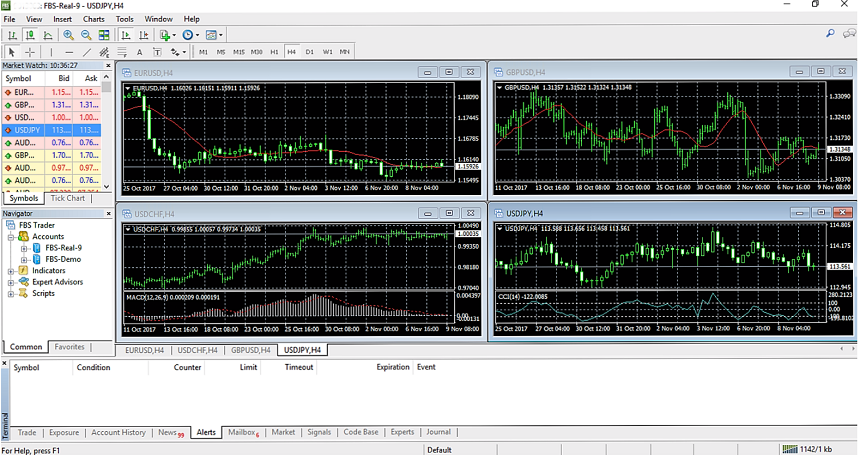
interface MT4 trading terminal

To trade, you need to give your broker a command to open a trading position for you. Such a command is called an "order".

There are several ways to make a “New Order” window pop up:

  1. Choose “Tools” – “New order” in the program menu.
  2. Right-click on the chart; go into “Trading” – “New order”.
  3. Double-click on the name of the trading instrument in the “Market Watch” window.
  4. Click on the “New Order” button in the toolbar above the price chart.
  5. Press F9 key on the keyboard.

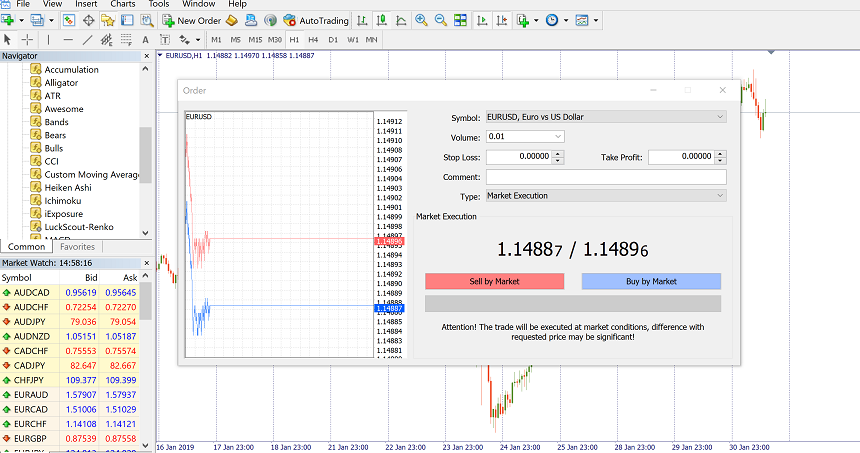
The “New Order” window will appear. Here you need to choose the parameters of your trade.
New Order settings MetaTrader

Customization of Trade Parameters

“Symbol” is the asset you want to trade. By default, the symbol on the active chart is chosen for trading, but you can pick another asset from the drop-down list. A corresponding tick chart will appear in the left pane.

The next is step is to determine the size of your position and write it in the field “Volume”. In MetaTrader you set position size in lots: 1.0 is equal to 1 lot, or 100,000 units. You can read up on how to choose a position size in the article How to determine position size?.

Then it’s time to set the “Stop Loss” and “Take Profit”. These fields are blank by default. You can enter this information right away or later or choose not set these levels at all.

Stop loss (SL) is an exchange rate at which your trade will be automatically closed if the price goes in an adverse direction. Thus, SL limits your possible loss: in the worst case, you won't lose more than the amount you chose as a stop loss. 

Take profit (TP) is an exchange rate where your trade will be automatically closed if the price goes in your favor. In other words, it’s your profit target.

If stop loss and take profit values are set, they will appear on the chart as horizontal lines at the corresponding price levels, making it easy for you to monitor open trades. If SL and TP levels were set too close to the current price, you will see an error message: “Incorrect S/L or T/P”. You will need to move the levels farther from the current price and repeat the request.

The next important field is “Type”. There are 2 types of orders – market orders and pending orders. The main difference between these 2 types is that market orders are automatically opened at the current market price while pending orders can be set for a specific price in the future.

If you choose market execution, your trade will open as soon as you hit the button “Sell by market” or “Buy by market”. If you choose a pending order option, you will be able to choose entry levels in advance. In this case, the trade will automatically open once the price level that you have chosen is reached, and you won’t need to be in front of the monitor when it happens. Read about the types of pending orders Types of orders.

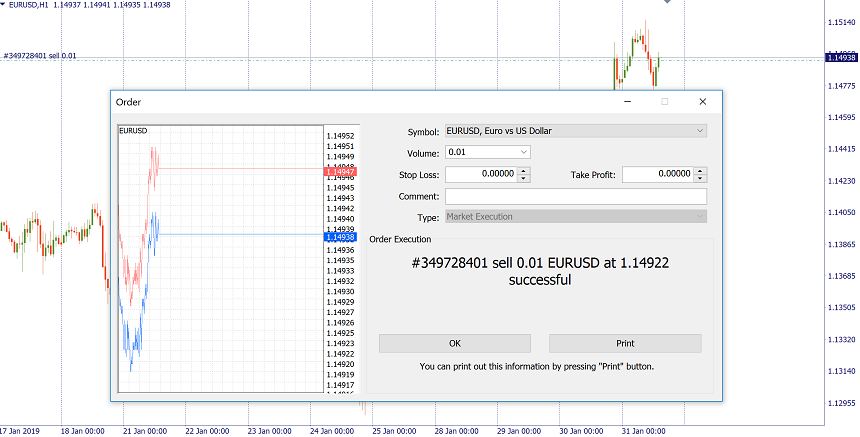
If “Sell” and “Buy” buttons are inactive, it means that you have chosen an incorrect order volume for this account type. Please check your settings for order volume and compare them to the trading conditions stated on our website.
trading conditions of new order in metatrader

The open order can be viewed in the Terminal window by clicking on the Trade tab.

Trade candlestick chart MT4

How to close an order?

If you have set stop loss and take profit levels, the trade will automatically close once the price reaches one of these levels. If you want to close a trade at any time, highlight the trade in the Trade tab of the Terminal, right-click and select “Close Order”. Another way is to double-click the trade in the Terminal. A window appears prompting you to confirm that your trade should be closed. Click “Close #####” (the yellow horizontal bar at the bottom of the window) to close the trade. 

Open position can also be closed by an opposing position or, in other words, a reverse position for the same symbol. To do this, open an Order window, select “Close by” in the “Type” field, choose a position and press “Close”. It allows closing two positions at the same time. If the position sizes in lots differ, only one of two opposite positions will remain. The volume of this position will equal to the difference between lots of the two closed positions, and its direction and open price (short or long) will correspond with those of the larger (in volume) of two closed positions.

Choosing the volume of a trade is a big challenge for beginner traders. Let’s sort it through!

There are several ways to choose the size of your position.

1. Fixed lot size

The idea here is that a trader uses the same trade volume in lots for every trade. This way is simple to understand for those who have only recently started trading. It’s recommended to choose small trade sizes. It’s possible to change the position size if the size of your account significantly changes. The pip value will be the same for you all the time.

Example

You have $500 on your account. With 1:100, this amount will be enough to make 50 trades of 0.01 lot each. Each trade will require $10 margin.

If you use the same lot size every time, your account can show stable growth. This is a good option for those who can’t easily adjust to the exponential growth of their trade sizes because of higher stress levels which are associated with it. More experienced traders, however, may want to have an approach with greater flexibility and bigger potential account expansion.

2. Percentage of equity

In this case, you choose the size of your position as the percentage of your equity. If your equity increases, so do your position sizes. This, in turn, can lead to geometric growth of your account. At the same time, it’s necessary to remember that the declines of your account after losing trades will be bigger as well.

The recommendation is not to use more than 1-2% of your deposit for one trade. This way even if some of your trades aren’t successful, you won’t lose all your money and will be able to keep trading.

Here’s a formula of the position size in lots:

Lots to trade = Equity * Risk(%) / Contract Size *  Leverage

Example

You have $500 and decide that the acceptable risk level is 2% of your account. With 1:100 leverage, your need to choose ($500 * 0.02) / 100,000 * 100 = 0.01 lots.

With $1000 on your account, you will be able to trade ($1000 * 0.02) 100,000 * 100 = 0.02 lots.

This approach is not the best option for smaller accounts. It may happen that if you have a large loss, the risked percentage will be too small to act as a margin even for the smallest lot size. As a result, you will be forced to break your risk management rules and allocate more money to keep trading. Moreover, as this approach doesn’t take into account what’s happening on the price chart, the size of Stop Loss it allows may be too big.

As the position size depends on equity, the loss will make position size smaller, so that it will be harder for a trader to recover the account after a drawdown. At the same time, if the account becomes too big, the size of each trade way turn to be uncomfortably big as well.

3. Percentage of equity with a stop loss

Here you base your position size not only on the predetermined percentage risk per trade but also on your stop loss distance. Let’s break this process in 3 steps.

Step 1. The recommendation stays the same: don’t risk more than 1-2% of your deposit/equity for one trade.

If your equity is $500, 2% risk will cost you $10.

Step 2. Establish where the stop loss should be for a particular trade. Then measure the distance in pips between it and your entry price. This is how many pips you have at risk. Based on this information, and the account risk limit from step 1, calculate the ideal position size.

If you want to buy EUR/USD at 1.1100 and place a stop loss at 1.1050, your trade risk is 50 pips.

Step 3. And now you determine position size based on account risk and trade risk. In other words, you need to determine the number of lots to trade that will give you the risk percentage you want with the stop distance that fits your trading system.

The important thing is to adjust your position size to meet the desired stop loss and not the other way round. Your risk will be the same in every trade, but the position size may be different because stop loss distances may vary.

Remember that a 1,000-unit lot (micro) is worth $0.1 per pip movement, a 10,000-unit lot (mini) is worth $1, and a 100,000-unit lot (standard) is worth $10 per pip movement. This applies to all pairs where the USD is listed second, for example, the EUR/USD. If the USD is not listed second, then these pip values will vary slightly. Note that trading on a standard lot is recommended only for professional traders.

Use the formula:

Lots to trade = Equity * Risk% / (Stop Loss in Pips * Pip Value) / 100

Example

As it turns out, you will be able to trade $500 * 0.02 / (50 * $0.1) = $10/$5 = 2 micro lots. The outcome is in micro lots because the pip value used in the calculation was for a micro lot.

Your next trade may only have a 20 pip stop. In this case, your position size will be $10/(20x$1) = $10/$20 = 0.5 mini lots, or 5 micro lots.

If you use this method, your position sizes will increase proportionally to the increase in your account (the opposite will happen if your equity decreases) and will be adjusted for the situation on the charts. As with the simple equity percentage technique, however, this option may also leave little room for maneuver if your account is small. In addition, this method won’t suit you if your trading strategy doesn’t involve knowing the exit levels in advance.

Conclusion

So, what is our ultimate recommendation for choosing a position size? It’s actually that you should pick the option you feel most comfortable with. As you can see, all techniques have their advantages and drawbacks, so the method that works well for one trader may not suit another. Much will depend on your trading strategy: does it imply big profit but the risk of big drawdowns as well or does it offer multiple opportunities of smaller profit? That will matter for your decision.

Although all these calculations related to position sizing may seem unpleasant, it’s in your best interest to get to the bottom of them. Knowing how to choose the right position size will make you a more disciplined trader and provide you with sound risk management. This is the way to maximizing your profit and minimizing your loss!

“Leverage” and “margin” are key definitions every trader should know. 

Leverage

Leverage allows you to trade with more money than you have on your account. How much more? Different brokers offer different leverage sizes. You can check the leverage provided by FBS in the “Trading” section of the website.

For example, if you have a leverage of 1:100, you will need to provide only 1% of the desired trade size and the rest 99% will be added by the broker to make your trade work. If you choose leverage of 1:50, you will need to provide 2% of the trade size (1/50 = 0.02). 

Why do brokers give traders leverage? Notice that the sizes of lots on Forex are quite big. The minimum position size in 0.01 lot. For EUR/USD currency pair that accounts for 1,000 euro. Not everyone will want to trade with such amounts of money, especially at the beginning. As a result, brokers provide traders with the opportunity to invest only a small part of the money to finance such a trade. 

Example. You want to trade 1 lot in USD/CAD. 

Situation 1. You provide $100,000 (1 standard lot) and make your trade. You don’t borrow money from the broker. 

Situation 2. You can spare only $100. In this case, you will need a 1:1000 leverage. With this leverage, your broker will provide the remaining $99,900 to help you open the trade.   

You can choose the size of leverage you would like to use. The bigger the leverage, the more profit you will get from each pip the price moves in your favor. As a result, skilled traders may use bigger leverages in order to make profits faster and/or in larger quantities. Think of a leverage as of a springboard that will allow you to make a bigger jump and get closer to victory. 

At the same time, you should always be aware that your risks also increase with leverage. If you opened a buy trade but the price is going down, each pip the price moves against you will bring you a bigger loss the bigger the leverage you are using. As a result, you should be careful and choose a reasonable leverage size. The most common leverage among Forex traders is 1:100. 

Margin

You may be wondering how brokers survive if they allow traders to borrow so much money from them. The answer is that brokers are protected because of the margin. Margin is an amount of money you need to have on your account to open and maintain a leveraged trade. 

When we explained leverage, we showed you the situation where to control $100,000 with $100 you need 1:1000 leverage. In this example, $100 is what is called “margin”. You can see that the margin size depends on your desired trade size (i.e. how many lots you want to trade) and on the leverage you have chosen (you can specify the leverage for your account in your personal area with FBS). All in all, the bigger the leverage you use, the smaller the margin you will need to make a trade.

In your terminal “Trade” window you can see columns “Balance”, “Equity”, “Margin”, and “Free margin”. So, the margin is the amount of money you have already used: this sum finances your current open trades. The amount of money you can still use for new trades is reflected in the “Free margin” area. Your free margin will always be equal to “Equity” less “Margin”. 

In your terminal Trade window

Brokers usually define the “margin call” level. This level represents a certain percentage of margin. If you have a losing trade and your equity falls to that level, you will get a warning from the broker that you need to close your trade or deposit more money to meet the minimum margin requirement. The trading server may also make a decision to close the trade. 

There’s also a level called “stop out”. It comes in sight if you keep losing money in an unsuccessful trade. If your losses pull your equity to that level, then the broker will be entitled to close your trading position without any warnings.

At FBS, a margin call is at 40% and lower. It means that you’ll get a margin call if your account equity drops to 40% of the margin and lower (in our example, 40% of $100 is $40). A stop out equals to 20% at FBS, so your trade will be automatically closed if your equity drops to $20 (20% of the margin and lower). 

Margin is needed for your broker’s security in case the market goes against your position. It’s in your interest as a trader to avoid margin calls. If you are careful and abide by the rules of risk management, you will be able to do that and trade with profit.

If you want to become a Forex trader and are wondering how much money you should spend on trading, you have come to the right place. In this article, we explain what is the minimal amount of money you will require to trade currencies.

To begin with, remember that there are demo accounts that allow you to practice trading without investing a single dollar. The size of a demo account with FBS can be up to $1 million. The demo account will allow you to practice opening orders and setting position sizes.

If you are ready to trade using the real account and make real money, you should know that the amount of money you need to start trading depends on the account type you choose.

For example, to trade on the micro account you will need to deposit at least $5. You will be able to open orders the volume of which starts from 0.01 lots and use decent leverage. If you plan to open many trades, consider a standard account with a 0.5-pip floating spread. This type of account requires a minimal investment of $100. Notice that you can open one account of each type. In order to be able to open up to 10 accounts of any type, you need to verify your personal area, change confirmation method from email to SMS, and make sure that the total deposit to all accounts in your personal area is $100 or more.

Your deposit determines your trade size

The minimum trade size with FBS is 0.01 lots. A lot is a standard contract size in the currency market. It’s equal to 100,000 units of a base currency, so 0.01 lots account for 1,000 units of the base currency. If you buy 0.01 lots of EUR/USD and your leverage is 1:1000, you will need $1 as a margin for the trade. If you deposited $5 on the micro account, you deposit will cover this margin and you will be able to open another 4 trades of this size. Each pip of price movement will either bring you or cost you $0.1.

Let’s consider some good options for a beginner trader. The examples we bring here are safe and sound from the point of risk management.  

Deposit = $100

The amount of risk for a single trade should be below 5%, no matter how big your deposit is. Let’s go with a 3% risk ($3). If you trade 0.01 lots, you can have a Stop Loss of up to 30 pips — this is more than enough for an intraday position. The recommended risk/reward ratio is ⅓, so the potential profit for this trade will be 90 pips ($9).

Deposit = $500

What if your deposit is $500? With 3% risk ($15), your trade size can be 0.15 lots. In this case, each pip of profit/loss will account for $1.5. With a bigger position size, you’ll be able to earn money faster! There will be 10 points for a Stop Loss. If you need a wider Stop, you can trade 0.1 lot: this will make each pip cost $1. Stop Loss will be 15 points. With 5% risk ($25), you can allow a 25-pip SL. The profit in this case (if your Take Profit is 3 times bigger) will be $75.

Deposit = $1000

If your deposit is $1000, you, of course, will be capable to open even bigger trades. The risk of 3% for a trade ($30) and 1:1000 leverage will allow you to trade 0.3 lots. The risk of 10% ($100) will allow you to trade 1 lot. In this case, 30 pips of profit will account for a gain of $300. The optimal risk of $30 a trade will allow you to trade 0.1 lots with the SL of 30 pips. The potential gain will be $90.

Another important thing: remember about Margin Calls and Stop Outs. Margin Call is an allowed margin level of 40% and lower. At this point, the company is entitled but not liable to close all open positions of a client due to the lack of free margin. Stop Out is a minimum allowed level of margin (20% and lower) at which the trading program will start to close client’s open positions one by one in order to prevent further losses that lead to negative balance (below $0).

If you abide by the rules of risk management and don’t put your entire deposit in trading at once, you’ll be safe from Margin Calls and Stop Outs.

Conclusion

As you see, you need at least $5 to start trading. The rest is up to you! Make an estimate of your knowledge and experience and also think about your goals. How much money would you like to earn? How often will you trade? The bigger the deposit, the bigger position sizes, the more you will earn from one trade. All of that should be weighed against the background of risks. 

Please make sure that you spend only your spare money on trading and not the money that covers your basic life needs. Trading offers great opportunities to profit, but it’s risky and losses are possible.

Fundamental factors are not an abstract concept. Traders face them daily in a form of economic news, published in the economic calendar.

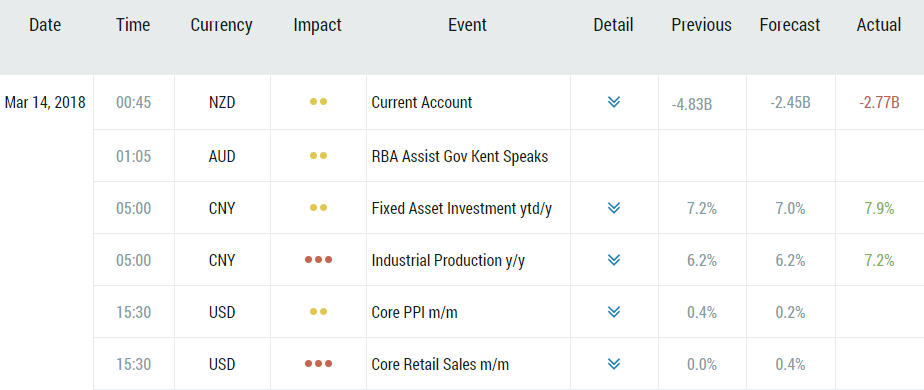
Let’s have a look at the economic calendar. For each date, you can see a list of scheduled economic releases corresponding one of the major Forex currencies. Pay attention to the release time: make sure that you have made adjustments for your time zone. You can see that all events have different impact: the higher this impact is, the stronger move of the market is expected, so you can focus on the most important events.

Most news in the calendar represent economic indicators and have numerical values. The previous reading is available in advance. The forecast is the median forecast of 20-240 economists surveyed by big agencies like Bloomberg, Reuters, etc. The actual reading is the reading published by the official source (the nation’s statistics agency or an analytical center).

For most indicators, if the actual reading is higher than the forecast one, it’s positive for the currency in question. Unemployment indicators are the exception: for them the lower the reading, the better for the currency. 

Economic Calendar

How to use Calendar

By the way, there are different ways to use the economic calendar. Some market players trade “the news". It means that they open positions in accordance with their expectations for a change in economic indicators (for example, eurozone GDP is expected to improve – we buy the euro). Others, on the contrary, avoid the news as trading them is associated with risks of too rapid price movements. Such traders prefer to wait until the market “digests” the news and enter the already shaped trend.

No matter what strategy you choose, we strongly recommend you follow the news in order to be aware of the market moving impulses. Some data releases increase volatility and cause sudden moves on the market. The best example is the US nonfarm payrolls (NFP). The release of this indicator may lead to the unexpected closure of your position under a stop-loss order.

There’s a difference between a trade that lasts several hours and a trade you keep open overnight. This difference is a swap.

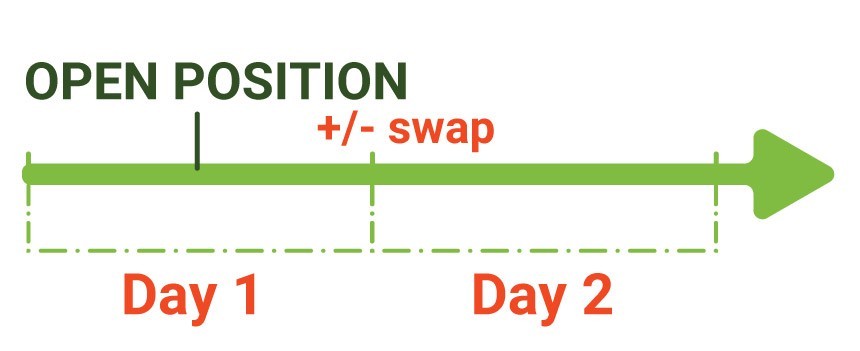
A swap is an interest fee that is either paid or charged to you at the end of each trading day if you keep your trade open overnight. The procedure of moving open positions from one trading day to another is called rollover. If a trader extends his position beyond one day, he/she will be dealing with a cost or gain, depending on prevailing interest rates.

swap

Let’s study an example.Imagine you bought EUR/USD. Your goal wasn’t to exchange money, you wanted to benefit from a speculative trade. In other words, you don’t need a specific amount of actual currency delivered to you, you only want the exchange rate to change in the direction of your bet because this will bring you profit. As a result, your order simply gets transferred to another day without the delivery of a real currency.

How are swaps calculated?

When you buy EUR/USD, ipso facto buy EUR and sell USD. When you sell USD you don’t own it, you borrow and pay interest on this credit if you keep a position open overnight.

If the interest rate for the euro is 0.5% and the interest rate for the US dollar is 2%, after a 0.5% — 2% = -1.5%.

You will have to pay the amount of the swap during the rollover.  

In other words, your position will earn the interest rate of the currency that you have bought, and you will owe the interest rate of the currency that you sold. The difference in interest rates is what is called a swap.

When you sell EUR/USD, you buy USD and sell EUR. In case of rollover, there will be a positive swap of 1.5% (2% — 0.5% =1.5%).

Most brokers perform the rollover automatically by closing open positions at the end of the day, while simultaneously opening an identical position for the following business day. During this rollover, a swap is calculated. Brokers can also add their own charges to swaps.

The examples above show the basic logic of swap calculations. In reality, things are more precise as the interest rates are divided by 365 (to get an interest rate for 1 day) and there are other parameters in the swap’s formula like your account currency, volume, and price of a trade, as well as broker’s commission.

3-day swap

There’s one exception is how much you pay for rollover. Swap is 3 times bigger than usual if you keep your position overnight from Wednesday to Thursday. It happens because of the impact of the futures market. A swap involves pushing back the value date on the underlying futures contract. If a position was opened on Wednesday, the value date will be Friday. If a position is kept open overnight from Wednesday to Thursday, the value date will be moved forward to Monday, i.e. by 3 days, because there’s no trading during the weekend. As a result, the interest is charged for 3 days instead of just one.

Where to check swap sizes?

You can look up swaps long and short at your broker’s website. The specification of currency pairs usually represents swap as the number of base currency units for each currency pair on a 1-lot position.

It’s also possible to check swaps in Metatrader. The trading terminal automatically calculates and reports all swaps for you. You will be able to see swaps on your open position (if you keep it open for longer than 1 day) when you open a “Terminal” window and click on the “Trade” tab. The swap will influence the value of your profit.

swaps in Metatrader

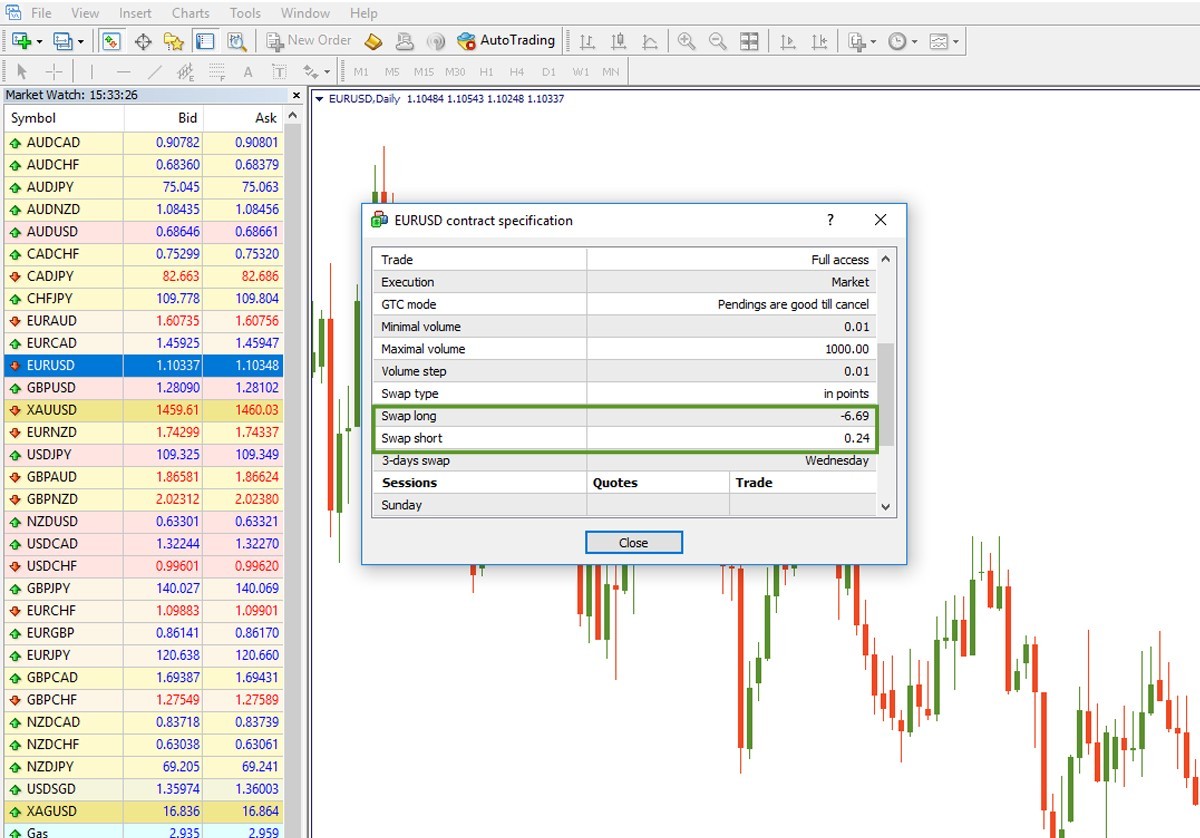
You can also right click on the symbol of a currency pair in the “Market watch” window and choose to see “Specification”. A window with information about this trading instrument will pop up and it will contain swaps among other figures.

check your swaps in MetaTrader

Should you take swaps into account?

If you trade only intraday without rollovers, swaps aren’t your concern at all. Even if you keep a trade open for several days (up to 2 weeks) and trade one of Forex majors, your gain/loss from swaps will likely be small compared to the outcome of your trade (your profit or loss). As a result, many traders do not pay attention to swaps.  

Swaps will become important if you hold an open position for longer than 2 weeks and if you trade exotic currencies that may have high interest rates.

If you entered EUR/USD long at 1.0500 and prices moved higher to 1.0550, it means that you made 50 pips. Congratulations! You’ve earned some money. OK, you might say, but how much? Good question! Let us calculate your profits.

There is a simple formula for this:

1 pip in the decimal form / the current exchange rate of the quote currency to the US Dollar = value per pip.

In our case:

0.0001/ 1 = 0.0001 (rounded up). It means that you will get this sum for every pip of your profitable trade.

As you can see is not a large sum of money. Well, it’s because it is the value of a pip per unit, but traders operate with a bigger number of units — so-called lots.

Calculate the profit using the FBS calculator

What is a lot?

A lot is an order of a certain number of units. Historically, spot Forex trading was only available in specific amounts of base currency called lots. A standard size of a lot equals to 100,000 units of a base currency. Later on, when Forex market opened for traders with smaller capital, a mini and even a micro lot became available.

Lot by Number of Units ForexCalculating 1 pip value for different currency pairs

You may see that the smallest lot is a micro lot (1,000 units of a base currency, it is often referred to as 1K). You can trade 1 000, 2 000, 3 000 or 124 000 units so long as it can be multiplied by 1K. Each 1K is referred to as a lot.

So, if you as in the last example open a long trade with one standard lot on EUR/USD, you will be buying 100,000 units. In this case, your profit will be not 0.00009478 USD for 1 pip the price goes in your favor, but 0.00009478 USD *(multiplied) 100,000 which is approximately 9.4787 USD. You may also open trade with mini (10,000), or even micro (1,000) lots. In this case, your profits will be something like 0.94786 USD and 0.09478 USD per 1 pip accordingly.

You should remember that the US Dollar is a quote currency in many pairs (EUR/USD, GBP/USD etc.). It means that the exchange rate of the quote currency to USD equals to 1.

  • For such pairs one pip will always cost $10 when we trade a 

    100 000 — unit contract (1 standard lot):100 000 * 0.0001 / 1 = $10 (pip value for EUR/USD)

  • For the pairs where the US Dollar is a base currency (USD/CHF, USD/CAD), pip value depends on the exchange rate:

    100 000 * 0.0001 / 1.0195 = $9.8 (pip value for USD/CHF)

  • For the pairs that include the Japanese yen the pip value is calculated as follows:

    100 000 * 0.01 / 120.65 = $8,28 (pip value for USD/JPY)

Lot

A lot is a number of currency units. A standard lot equal to 100,000 units of a base currency/your account currency. It means that if you want to trade EUR/USD, you will need $100,000. There are two other well-known lot sizes. They are a mini lot (equal to 10,000) and a micro lot (equal to 1,000 units).

To open a trade, you will need to decide how much money to put into it. The term ‘lot’ is closely linked to such notions as ‘leverage’ and ‘pip’. Let’s get deeper into this topic.

Leverage

A great benefit of trading at the Forex market is leverage. As we already said, a standard lot is $100,000, but it doesn’t mean that you have to invest this huge amount of money by yourself. Your broker can help you. The standard leverage is 1:100. It means that if you want to trade one standard lot of the pair, you have to deposit just $1,000. Your broker will invest the remaining $99,000.

There are other sizes of the leverage depending on a broker. You can check the leverages provided by FBS: FBS Leverage.

Pip

Reading analytic articles or news you definitely saw such phrase “the pair rose/declined by … pips”. What is the pip and how does it affect the amount of money you earned?

A pip means “Percentage in Point”. It represents the smallest change a currency pair can make. Usually, a pair is counted in four decimal points, for example, a quote of GBP/USD is given like this: 1.3463. However, there are some pairs that have 2 decimal points. For example, the US dollar/Japanese yen is quoted like 109.70. A pip is represented by the last decimal of a price/quotation.

If EUR/USD changed from 1.0800 to 1.0805, this would be a change of 5 pips. If USD/JPY changed from 120.00 to 120.13, this would be a change of 13 pips.

Note that some Forex brokers also count the 5th and the 3rd decimal places respectively. They are called “pipettes” and make the spread calculation more flexible.

One Pip

Let’s learn how to count a value of one pip.

We will use the USD/JPY pair as an example. The exchange rate is 110.80.

(0.01 (a pip)/110.80(an exchange rate) X 100,000 (a standard lot) = $9,03 per pip

one pip formula

Let’s count a pair where the USD is not a base currency. For example, EUR/USD. The exchange rate is 1.15.

(0.0001/1) X 100,000 = $10 per pip

pip formula

Pip, Lot and Leverage all together

You have learned what leverage, lot, and pip are. Now it’s time to use your knowledge.

Imagine you trade the EUR/USD pair with 100,000 lot size. You deposited $1,000. Your leverage is 1:100. You made a buy trade at 1.15, the pair went up and you closed your position at 1.1550. It means you earned 50 pips.

Above we have calculated that for EUR/USD 1 pip = $10.

You earned 50 pips, so it means that your profit would be $500.

However, you should remember that the amount of your profit will depend on a lot size, a number of lots you trade, a currency pair and your account currency.

Imagine you traded without a leverage. You deposited $1,000. 0.0001 X 1,000 = 0.1 per pip

As a result, you would earn just $5.

ratio of Pip Lot Leverage

Now you know how leverage, lot, and pip are linked. And you even can calculate your profit. It’s time to practice your knowledge! OPEN YOUR ACCOUNT

The decision to buy or sell the currency pair depends on your expectations of the future price. If you think that EUR/USD will rise, you buy the pair or, in other words, open a long position on this pair. If you think that the EUR/USD will fall, you sell the pair or, as traders say, open a short position on this pair. As some time passes and the price of EUR/USD changes, you close the position and get the profit if the price changed in line with your expectations. If the price moved in the opposite way, you have a loss on this transaction.

To perform these operations, you need to place orders – give special commands to your broker in the trading terminal. There are several different types of orders, the main are market orders, pending orders, take profit orders and stop loss orders. Let’s see what are their functions.

Market orders – buy and sell – are designed to open positions at the current market price. The position will be opened immediately after you place such order. Pending orders, on the other hand, allow you to choose entry levels in advance. In this case, the trade will automatically open once the price level that you have chosen is reached, and you won’t need to be in front of the monitor when it happens.

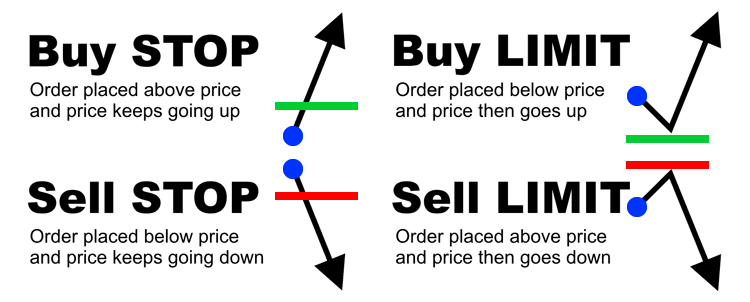
If you think that the price of the currency pair will rise and then reverse to the downside, place Sell Limit above the current price. If you expect the currency pair to decline and then reverse to the upside, place Buy Limit below the current price. If you think that selling will intensify once the price breaks a certain level on the downside, place Sell Stop below the current price. If you expect that buying will intensify once the price breaks a certain level on the upside, place Buy Stop above the current price.

order-types.png

In order to close profitable positions, use an order type called Take Profit. In order to close unprofitable position use Stop Loss order. For example, you enter a stop order 50 pips away from your entry point. As soon as the market moved 50 pips against you, your stop order would automatically close you out of that trade protecting you from losing more than 50 pips.

Follow US on Facebook

Popular Posts